Mastering Texture and Tone with Halftone Procreate Brushes
In the rapidly evolving landscape of digital illustration, the line between traditional print aesthetics and modern digital workflows continues to blur. Artists, designers, and content creators are increasingly seeking tools that not only streamline their production but also infuse their work with a distinct, tactile character. This is where Halftone Procreate Brushes have become an indispensable asset for iPad users. By bridging the gap between vintage printing techniques and contemporary digital convenience, these tools allow creators to achieve complex shading and textural effects with unprecedented speed and precision.
The resurgence of halftone patterns in modern design is not merely a nostalgic trend; it is a response to a saturated visual market. In an era dominated by sleek, vector-based graphics and hyper-realistic 3D renders, the organic imperfection of halftones offers a refreshing contrast. Whether you are a professional illustrator working on editorial pieces, a marketer designing eye-catching social media assets, or a hobbyist exploring comic book styles, understanding how to leverage these specific brushes can significantly elevate your creative output.
The Evolution of Digital Texturing
Historically, achieving a true halftone effect required meticulous manual labor or complex filter applications in desktop software like Adobe Photoshop. Designers had to manipulate dot sizes, spacing, and angles manually to create gradients and shadows. While effective, this process was time-consuming and often lacked the intuitive feel of hand-drawing. The introduction of specialized brush sets for mobile platforms has revolutionized this workflow.
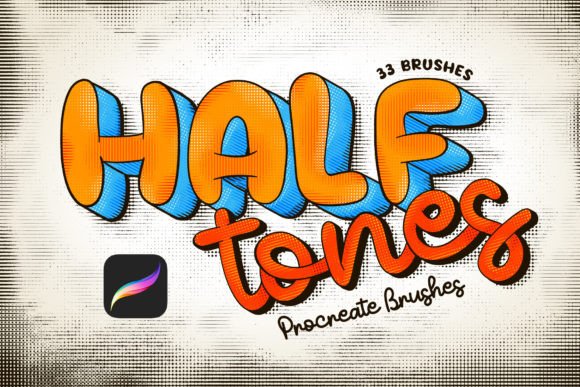
Today, the demand for agility in creative processes is higher than ever. Freelancers and agency professionals alike need to deliver high-quality visuals under tight deadlines. The Halftone Procreate Brushes address this need by offering a "great set for artists" that prioritizes ease of use without sacrificing quality. With thirty-two distinct brushes included in the package, users have a versatile toolkit at their fingertips. This variety ensures that whether you need a crisp, clean look for a modern tech blog header or a gritty, dirty texture for a punk-rock poster, there is a brush specifically calibrated for that aesthetic.
Why Pen Pressure Sensitivity Matters
One of the most critical features of this brush set is its deep integration with the Apple Pencil’s pen pressure sensitivity. For many digital artists, the disconnect between hand movement and on-screen result is the biggest barrier to natural expression. These brushes are engineered to respond dynamically to the pressure applied by the user. A light touch creates sparse, delicate dots, while increased pressure results in denser, darker clusters.
This responsiveness makes it incredibly easy to make shades and gradients organically. Instead of relying on static overlays or pre-made textures that can look flat and repetitive, artists can build up tone gradually, much like they would with ink or charcoal on paper. This level of control is essential for creating depth and dimension in illustrations. It allows for a more intuitive drawing experience, where the tool feels like an extension of the artist’s hand rather than a rigid software function.
Clean vs. Dirty: Versatility in Style
A standout aspect of this collection is the inclusion of both clean and dirty versions of the halftone patterns. This duality caters to a wide range of artistic intentions and project requirements.
- Clean Versions: These brushes produce uniform, precise dots ideal for modern graphic design, pop art, and polished commercial illustrations. They are perfect when you need clarity and readability, such as in infographic elements or branding materials where consistency is key.
- Dirty Versions: These variants introduce intentional irregularities, noise, and texture. They mimic the look of aged newsprint or imperfect screen printing. This style is particularly effective for editorial illustrations, zines, album covers, and any project aiming for a raw, authentic, or vintage feel.
Having both options within a single brush set eliminates the need to switch between different apps or purchase multiple plugins. It streamlines the creative process, allowing artists to experiment with different moods and textures seamlessly within the same canvas.
Practical Implications for Modern Workflows
For professionals and entrepreneurs, time is a valuable currency. The ability to generate complex textures quickly translates directly into efficiency. Consider a social media manager who needs to create a series of engaging posts for a product launch. Using standard digital tools, adding texture might involve multiple layers, masking, and adjustment filters. With Halftone Procreate Brushes, the same effect can be achieved in seconds with a few strokes. This speed does not compromise quality; instead, it frees up time for conceptual thinking and refinement.
Moreover, these brushes are compatible ONLY with Procreate application for Apple iPad. This specificity is actually a benefit for iPad-centric workflows. Procreate has become the industry standard for mobile digital art due to its robust feature set and intuitive interface. By optimizing exclusively for this platform, the brush developers ensure maximum performance and stability. Users should note that these brushes will not work with Adobe Photoshop or any other graphic editing software. This limitation underscores the importance of choosing the right tools for your specific hardware and software ecosystem. If your primary workspace is the iPad, this integration offers a seamless experience that desktop-bound alternatives cannot match.
Getting Started: Installation and Use
Adopting new tools should not be a hurdle. The developers of this brush set have prioritized user-friendly installation, ensuring that even those less tech-savvy can get started immediately. The process is straightforward and requires no complex configuration.
- Download the files on your iPad: Ensure that the brush set file is saved to a location accessible on your device, such as the Files app or iCloud Drive.
- Click on .brushset files: Locate the downloaded file. Tapping on it will trigger the system to recognize it as a Procreate-compatible asset.
- Automatic Installation: Procreate will automatically install all the brushes. Once completed, they will appear at the top of your brush list, ready for immediate use.
This simplicity lowers the barrier to entry, allowing creators to focus on what matters most: their art. There is no need for manual import scripts or troubleshooting compatibility issues. The brushes are ready to go the moment you open your canvas.
Integrating Halftones into Your Creative Practice
To make the most of these tools, consider experimenting with layer blending modes. Combining halftone brushes with multiply or overlay modes can create rich, complex interactions with underlying colors. Additionally, varying the opacity of the brush stroke can add subtlety to shadows, preventing them from appearing too harsh.
For educators and bloggers, these brushes offer a unique way to illustrate concepts visually. The distinct style of halftones can help break up text-heavy content, making articles and tutorials more engaging. For business owners, using textured graphics in marketing materials can help brand identity stand out in a crowded digital space. The key is to use the tools intentionally, matching the texture to the message you wish to convey.
In conclusion, Halftone Procreate Brushes represent more than just a digital utility; they are a bridge between traditional artistic sensibilities and modern efficiency. By offering pen pressure sensitivity, a variety of clean and dirty textures, and an easy-to-use format, they empower artists to explore new stylistic territories. As digital creation continues to dominate visual communication, having a reliable, versatile toolset like this is not just an advantage—it is a necessity for anyone serious about their craft. Whether you are refining your portfolio or launching a new brand, these brushes provide the texture and depth needed to make your work resonate.