Strategic Precision: Leveraging Sai Brushes for Photoshop in Professional Digital Illustration
In the competitive landscape of digital art and graphic design, tool selection is not merely a matter of preference; it is a strategic decision that impacts workflow efficiency, output quality, and client satisfaction. For professionals transitioning from Paint Tool SAI to Adobe Photoshop, or for those seeking the distinct aesthetic of manga and anime illustrations within a more robust ecosystem, Sai Brushes for Photoshop represent a critical bridge. These tools are not just cosmetic additions; they are functional assets designed to replicate the intuitive, low-latency feel of SAI while leveraging the advanced layering and editing capabilities of Photoshop.
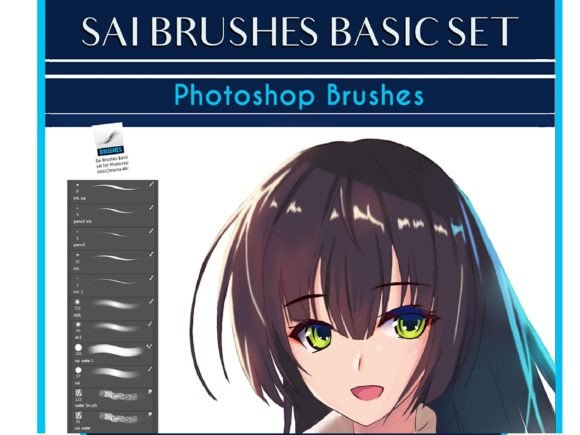
The integration of these brushes into your creative toolkit requires more than simple installation. It demands an understanding of how specific brush dynamics—such as ink stability, pencil texture, and watercolor blending—can streamline your production pipeline. By adopting a set of 13 specialized brushes created on CC19 that emulate the core SAI experience, artists and designers can achieve a level of precision that supports both rapid prototyping and high-fidelity final renders.
The Strategic Value of Emulating Paint Tool SAI
Paint Tool SAI has long been revered in the anime and manga community for its lightweight architecture and superior line stabilization. However, many professional environments standardize on Adobe Photoshop due to its industry-wide compatibility, extensive plugin support, and advanced color management. The friction arises when artists miss the "feel" of SAI’s native brushes. This is where Sai Brushes for Photoshop become strategically vital.
Using these emulated brushes allows professionals to maintain their established muscle memory and artistic style without sacrificing the powerful post-processing features of Photoshop. From a business perspective, this reduces the learning curve for new hires who may be SAI veterans and ensures consistency in output across teams. It is a decision that balances artistic integrity with operational efficiency.
Core Components of the Brush Set
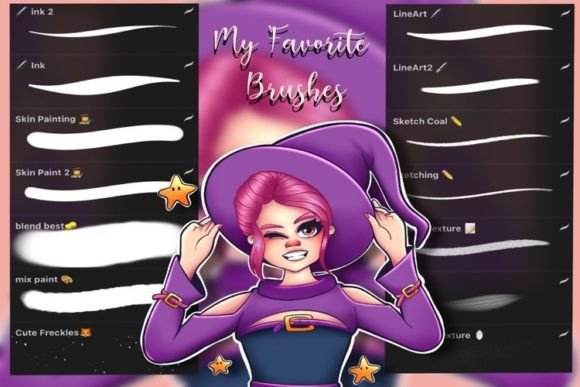
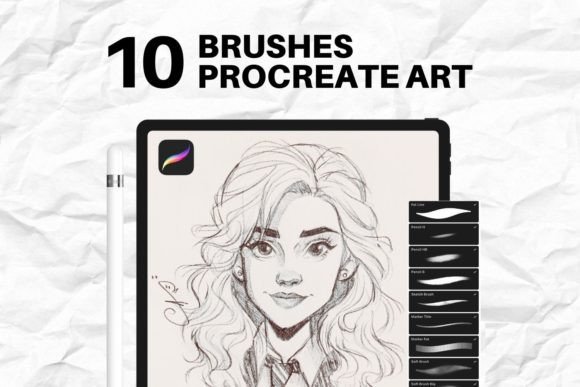
To make informed decisions about which tools to prioritize, one must understand the specific functions of the 13 brushes included in this CC19-compatible set. Each brush serves a distinct purpose in the illustration workflow:
- Ink Brushes: Designed for clean, sharp linework, these brushes mimic the binary precision of SAI’s pen tool. They are essential for creating the crisp outlines required in comic books and character designs.
- Pencil Brushes: These provide a textured, organic feel ideal for sketching and concept art. They allow for rough ideation before committing to clean lines, supporting the early stages of creative planning.
- Airbrush: Critical for soft shading and gradient transitions, the airbrush emulation ensures smooth tonal shifts without the banding issues often found in default Photoshop brushes.
- Water Brush: This tool simulates the fluidity of traditional watercolors, allowing for expressive, loose coloring techniques that add depth and personality to illustrations.
- Blending Brush: Perhaps the most significant tool for achieving the SAI look, this brush merges colors seamlessly, eliminating harsh edges and creating the soft, polished finish characteristic of high-quality anime art.
Understanding these components enables artists to select the right tool for each phase of production, thereby optimizing time and effort.
Enhancing Productivity and Workflow Efficiency
Time is a finite resource in any creative enterprise. The primary advantage of using Sai Brushes for Photoshop lies in their ability to reduce the number of steps required to achieve a desired effect. In standard Photoshop workflows, achieving the smooth blending typical of SAI might require multiple layers, masks, and blur filters. With the dedicated blending brush from this set, the same result is achieved in real-time through direct stroke manipulation.
This efficiency translates directly to better project management. Freelancers can take on more commissions, agencies can meet tighter deadlines, and educators can demonstrate techniques more fluidly during tutorials. The reduction in technical friction allows the creator to focus on composition, narrative, and aesthetic quality rather than troubleshooting software limitations.
Positioning and Branding Through Consistent Aesthetics
For creators building a personal brand or a studio identity, consistency is key. The unique visual language of manga and anime relies heavily on specific line weights and shading styles. By standardizing on a set of Sai Brushes for Photoshop, artists ensure that their output remains recognizable regardless of the underlying software updates or platform changes.
This consistency strengthens brand recognition. Clients come to expect a certain level of polish and style. When you deliver work that maintains this high standard through reliable tools, you build trust and long-term relationships. It positions you not just as an artist, but as a dependable partner who delivers predictable, high-quality results.
Decision-Making: When and How to Use These Tools
While these brushes are powerful, they are not a panacea for all digital painting challenges. Strategic use involves knowing when to rely on them and when to switch to native Photoshop tools. For instance, while the ink brushes are excellent for line art, complex photo-bashing or realistic texture work may still require Photoshop’s default hard-round or texture brushes.
Before fully integrating this set into your workflow, consider the following planning tips:
- Evaluate Your Current Style: If your work leans heavily towards cel-shading or soft-painted anime styles, these brushes will offer immediate value. If you specialize in hyper-realism, their utility may be limited.
- Test for Compatibility: Although created on CC19, ensure that your version of Photoshop supports the brush dynamics settings used. Most modern versions are backward compatible, but verifying pressure sensitivity and tilt response is crucial.
- Customize Settings: Do not accept default settings as final. Adjust the minimum diameter, spacing, and transfer dynamics to match your tablet’s pressure curve. This customization ensures that the tools feel like an extension of your hand.
Making these adjustments intentionally prevents frustration and ensures that the tools serve your specific ergonomic and artistic needs.
Risks of Unintentional Usage
Adopting new tools without a clear strategy can lead to diminishing returns. One common risk is over-reliance on the blending brush, which can result in muddy colors and a lack of definition if not used with discipline. Another risk is ignoring the fundamental principles of light and shadow, assuming that the brush will automatically correct poor foundational skills.
Furthermore, using Sai Brushes for Photoshop without understanding their underlying mechanics can lead to inconsistent file sizes and performance issues. High-resolution textures in pencil brushes, for example, can slow down older hardware. Professionals must balance aesthetic desires with technical constraints to maintain a smooth operational workflow.
Long-Term Value and Skill Development
Investing time in mastering this brush set yields long-term dividends. As you become proficient, you develop a faster, more intuitive workflow that can be taught to junior artists or scaled across larger projects. This scalability is crucial for small business owners and studio heads looking to expand their capacity without compromising quality.
Additionally, the skills learned in managing these brushes—such as adjusting flow, opacity, and mixing modes—are transferable to other digital painting contexts. This enhances your overall versatility as a creator, making you more adaptable to changing market demands and client requests.
In conclusion, Sai Brushes for Photoshop are more than just a collection of digital tools; they are a strategic asset for anyone serious about manga and anime illustration. By understanding their capabilities, integrating them thoughtfully into your workflow, and avoiding common pitfalls, you can achieve higher productivity, consistent branding, and superior artistic results. The decision to use them should be driven by clear goals and a commitment to excellence, ensuring that every stroke contributes to your broader professional success.