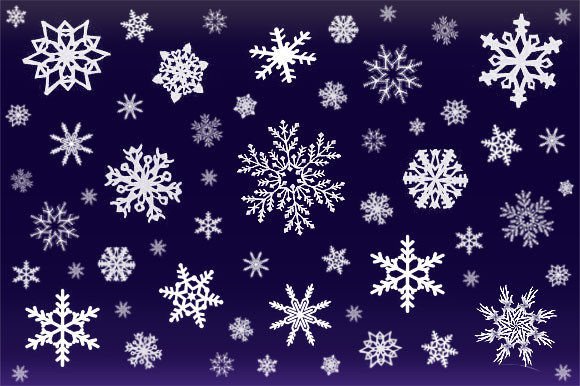
Elevating Digital Art with Precision Winter Snowflake Photoshop Brushes
Winter design projects often hinge on a delicate balance between atmosphere and clarity. Whether you are crafting holiday greeting cards, designing festive merchandise, or adding subtle texture to digital landscapes, the quality of your snow elements can make or break the final composition. Generic clipart rarely cuts it for professional work because it lacks the organic variation and blendability that modern audiences expect. This is where specialized tools come into play, transforming tedious manual painting into an efficient, creative flow. The 12 Winter Snowflake Photoshop Brushes represent a curated collection designed to bridge the gap between artistic vision and technical execution, offering designers a versatile toolkit for any cold-weather creative endeavor.
The Versatility of Multi-Format Asset Packs
One of the most significant hurdles for digital artists is software compatibility. A brush set that works flawlessly in Adobe Photoshop might be useless to a user relying on Corel PaintShop Pro or a web designer who needs standalone transparent images. A truly valuable resource respects the diverse ecosystem of creative software. By including not just the standard .abr files but also twelve dedicated Paint Shop Pro .psp files and a complete transparent PNG image pack, this asset collection ensures accessibility for a broad range of users.
The inclusion of transparent PNGs is particularly crucial for non-destructive workflows. These images allow drag-and-drop functionality across virtually any design platform, from Canva to PowerPoint, without the need for complex layer masking or background removal. For t-shirt designers using print-on-demand services, having high-resolution, transparent snowflakes means you can place intricate designs directly onto dark or colored fabrics without worrying about white halos or jagged edges. This flexibility expands the utility of the brushes beyond traditional digital painting into graphic design, web development, and social media content creation.
Enhancing Texture and Depth in Digital Paintings
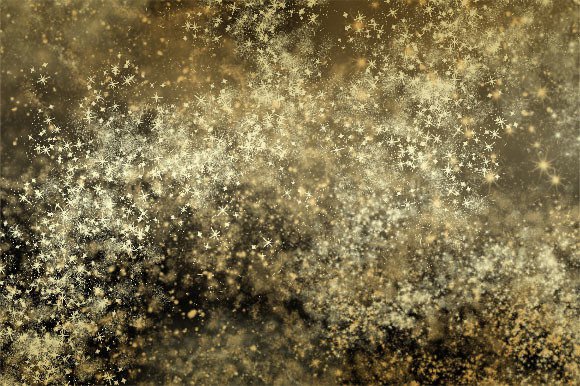
Creating realistic snow is notoriously difficult. Real snowflakes are never uniform; they vary in size, opacity, and crystalline structure. When using the 12 Winter Snowflake Photoshop Brushes, artists gain access to this natural irregularity. Each brush tip is engineered to mimic the unique geometry of ice crystals, ranging from simple six-pointed stars to complex, dendritic structures. This variety prevents the "stamped" look that plagues amateur winter scenes.
In digital paintings, these brushes serve multiple functions. They can be used as primary subjects, creating a focal point of intricate beauty, or as atmospheric effects, adding depth and distance to a landscape. By adjusting the brush dynamics—such as scattering, size jitter, and opacity control—artists can simulate falling snow, accumulated frost, or distant blizzards. The key is layering. Starting with larger, sharper flakes in the foreground and transitioning to smaller, softer, and more transparent shapes in the background creates a convincing sense of three-dimensional space. This technique is essential for concept artists working on game environments or illustrators creating book covers where mood is paramount.
Practical Applications in Commercial Design
Beyond fine art, these tools have immense practical value in commercial graphics. Consider the seasonal rush for holiday marketing materials. Businesses need eye-catching visuals for emails, social media posts, and website banners. Using pre-made, high-quality snowflake brushes significantly reduces production time. Instead of drawing each element from scratch, a designer can quickly populate a layout with festive motifs, allowing them to focus on typography and brand messaging.
For those in the apparel industry, specifically t-shirt and sticker design, the resolution and clarity of the brush strokes are critical. The 12 Winter Snowflake Photoshop Brushes are optimized for high-DPI output, ensuring that even when scaled up for large prints, the edges remain crisp and clean. Sticker designers, in particular, benefit from the transparent nature of the assets. Clean cut lines are essential for die-cut stickers, and using vector-like precision in raster brushes helps achieve that professional finish. Furthermore, the ability to customize the color of each flake allows for brand consistency. A tech company might prefer cool, icy blues, while a cozy coffee shop might opt for warm, golden-tinted snow to evoke a feeling of warmth amidst the cold.
Customization and Creative Control
While the presets are beautiful out of the box, the true power of these brushes lies in their customizability. Photoshop’s brush engine allows users to tweak every aspect of the stamp. You can change the angle of rotation to match the wind direction in your scene, adjust the spacing to create continuous trails of snow, or modify the hardness to simulate melting ice. This level of control empowers artists to adapt the 12 Winter Snowflake Photoshop Brushes to any specific stylistic requirement, whether it’s a hyper-realistic photograph enhancement or a stylized, cartoonish illustration.
Moreover, the added element mentioned in the package description serves as a bonus feature that can further enhance compositions. This could be a complementary texture, a light leak overlay, or a specific blending mode preset that makes the snow interact realistically with underlying layers. Such additions encourage experimentation, pushing users to explore new techniques like double exposure effects or mixed-media collages. By integrating these extra elements, designers can create unique visual signatures that stand out in a saturated market.
Workflow Efficiency and Professional Standards
Time is money in the creative industry. Tools that streamline repetitive tasks are invaluable. Manually placing individual snowflakes is not only time-consuming but often results in unnatural patterns. Brush sets automate this process while retaining artistic control. With a single stroke, you can generate a cluster of varied flakes, instantly adding complexity to a blank canvas. This efficiency allows for rapid prototyping and iteration, enabling designers to present multiple concepts to clients quickly.
Additionally, using professional-grade assets elevates the perceived quality of the final product. Clients and customers can subconsciously detect the difference between lazy design and thoughtful composition. High-quality snowflake brushes contribute to a polished aesthetic that builds trust and engagement. Whether you are creating a wedding invitation with a winter wonderland theme or a corporate end-of-year report cover, the attention to detail provided by these tools reflects professionalism.
Choosing the Right Tool for Your Project
When selecting digital assets, consider the scope of your project. If you are working exclusively in Photoshop, the .abr file is your primary tool. However, if you collaborate with teams using different software, the inclusion of Paint Shop Pro files and PNGs becomes a major selling point. It ensures that your workflow remains uninterrupted regardless of the platform. Always check the resolution of the PNGs to ensure they meet the print requirements of your specific project. For web use, 72 DPI is sufficient, but for print, aim for 300 DPI or higher.
It is also worth noting that these brushes are not limited to winter themes. Snowflakes are geometric marvels that can be repurposed for sci-fi interfaces, magical spell effects, or abstract backgrounds. By recoloring and manipulating the shapes, you can transform a winter staple into a futuristic data particle or a mystical energy burst. This versatility extends the lifespan of the asset pack, making it a worthwhile investment for any digital artist’s library.
In conclusion, the 12 Winter Snowflake Photoshop Brushes offer more than just seasonal decoration. They provide a robust, flexible, and high-quality solution for a wide array of design challenges. From enhancing the depth of digital paintings to streamlining commercial graphic production, these tools empower creators to produce stunning, professional-grade work with greater ease and efficiency. By embracing the multi-format nature of the pack and leveraging the customization options available, artists can unlock new levels of creativity and deliver exceptional results in any winter-themed project.