Mastering Realism with Procreate Skin Blending Brushes
In the evolving landscape of digital illustration, the gap between traditional media and tablet-based art continues to narrow. For artists specializing in portraiture, character design, or hyper-realistic rendering, the texture of skin remains one of the most challenging surfaces to replicate authentically. This is where specialized tools become indispensable. The Procreate Skin Blending Brushes offer a tailored solution for creators who demand nuance, softness, and organic flow in their digital workflow. Unlike standard round brushes that can leave harsh edges or uniform strokes, these custom tools are engineered to mimic the subtle gradations found in human complexion.
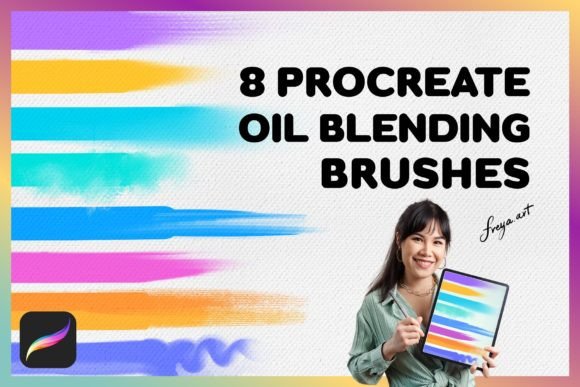
When paired with a complementary toolkit, such as the Set of 8 Procreate Oil Blending Brushes, artists gain a comprehensive suite for handling various textures. This combination allows for a seamless transition from the delicate smoothing required for facial features to the richer, impasto-style blending needed for hair, clothing, or background elements. Understanding how to leverage these assets can significantly elevate the quality of your digital portfolio.
The Anatomy of Digital Skin Rendering
Human skin is rarely a single, flat color. It is a complex interplay of subsurface scattering, pores, fine hairs, and varying levels of moisture and oil. Traditional digital brushes often struggle to capture this complexity without extensive manual layering. The Procreate Skin Blending Brushes address this by incorporating specific algorithms that respond dynamically to input. They are designed to soften transitions between colors while retaining enough texture to prevent the artwork from looking "plastic" or overly airbrushed.
The primary value of these brushes lies in their ability to maintain control. Many standard smudge tools in digital software tend to muddy colors, mixing them into a grayish blur. In contrast, high-quality skin blending brushes preserve the integrity of the underlying hues while gently merging boundaries. This is crucial for achieving the luminous quality seen in professional concept art and editorial illustrations.
Why Pressure Sensitivity Matters
It is important to note that these brushes are not static stamps; they are dynamic instruments. As stated in the product details, the brushes work the best when used with Apple Pencil as they rely on the amount of pressure used when drawing. This dependency on pressure sensitivity allows for a range of effects from a single tool. A light touch might yield a barely-there whisper of color, perfect for highlighting the bridge of a nose or the curve of a cheekbone. Heavier pressure increases opacity and blend intensity, useful for defining shadows under the chin or around the eyes.
For users accustomed to mouse-based input or non-pressure-sensitive styluses, the experience may feel limited. The nuanced variation that defines the utility of Procreate Skin Blending Brushes is directly tied to the hardware’s ability to detect tilt and force. Therefore, investing in a compatible stylus is not just a recommendation but a necessity for unlocking the full potential of these tools.
Expanding Your Toolkit: The Oil Blending Companion
While skin requires a delicate touch, other elements of an illustration often benefit from a more robust approach. This is where the Set of 8 Procreate Oil Blending Brushes becomes invaluable. Included in many premium bundles, this set provides eight distinct variations of oil-style blenders. These brushes simulate the behavior of traditional oil paints, where wet-on-wet techniques create rich, textured mixes.
The inclusion of a Bonus 1 Canvas Texture further enhances this experience. By applying a subtle grain to your canvas, you break up the digital perfection of the screen, adding a tactile quality that mimics traditional paper or fabric. When using the oil blending brushes over this texture, the strokes catch the "grain," creating a realistic resistance that feels natural to artists transitioning from physical media.
- Versatility: Use the oil brushes for hair, fur, fabric folds, and background landscapes.
- Texture Retention: Unlike smooth blenders, oil brushes retain brushstroke marks, adding character to the piece.
- Layer Interaction: These tools excel at merging layers without losing the depth of color.
Practical Applications and Workflows
Understanding the tools is only half the battle; knowing when to use them is where expertise develops. Here are several real-world scenarios where Procreate Skin Blending Brushes and the oil blending set can transform your workflow.
Portrait Illustration
Start with a base sketch and flat colors. Use the skin blending brushes to smooth out the cheeks, forehead, and neck. Focus on the transitions between light and shadow. Avoid over-blending; leave some intentional texture to suggest pores. Switch to the oil blending brushes for the hair, using broader strokes to create volume and movement. The contrast between the smooth skin and textured hair adds visual interest and realism.
Character Concept Art
In fast-paced concept design, readability is key. Use the skin blenders to quickly establish form and lighting on character faces. The speed at which these brushes allow you to gradient shades means you can iterate on designs faster. Use the oil brushes for armor, leather, or cloth, giving each material a distinct visual weight.
Digital Painting Studies
For students learning anatomy, these tools provide immediate feedback. If a muscle structure looks off, the blending brushes allow for quick corrections without repainting entire sections. This encourages experimentation and reduces the fear of making mistakes.
Technical Considerations and Limitations
Before purchasing, it is vital to understand the technical constraints of these digital assets. First and foremost, Procreate brushes are made for Procreate app for iPad and don’t work in other software like Adobe Photoshop. This is a common point of confusion for new digital artists. The file format (.brushset) is proprietary to Procreate. If you work primarily in Clip Studio Paint, Photoshop, or Fresco, these specific files will not be compatible.
Additionally, the performance of these brushes can depend on your iPad model. Older devices may experience slight latency when using complex brushes with high-resolution textures. Ensuring your device is updated to the latest version of Procreate will help mitigate any performance issues.
Another consideration is the learning curve. While these brushes are designed to be intuitive, mastering the pressure sensitivity takes practice. Users may initially find that they press too hard or too soft. It is recommended to spend time in a blank canvas, experimenting with different pressure levels to build muscle memory.
Evaluating Suitability for Your Needs
Is this toolkit right for you? Consider the following factors:
- Your Primary Subject Matter: If you focus heavily on portraits, fantasy characters, or realistic figures, the skin blending brushes are essential. If you work primarily in geometric abstracts or vector-style art, they may be less useful.
- Your Hardware: Do you own an iPad with Apple Pencil support? If yes, you are ready to go. If not, you may need to upgrade your hardware to fully utilize these tools.
- Your Software Ecosystem: Are you committed to the Procreate ecosystem? If you switch frequently between desktop and tablet apps, ensure you have alternative tools for non-Procreate platforms.
The Value of Instant Access
In the creative industry, inspiration can strike at any moment. The ability to integrate new tools immediately is a significant advantage. With this purchase, You’ll be able to download the brushes right after you complete your purchase – Instant Download. There is no waiting for shipping or physical delivery. You can import the .brushset file into Procreate within minutes and begin experimenting.
This immediacy supports a continuous learning loop. You can watch a tutorial, download the brushes, and follow along in real-time. This frictionless integration helps maintain creative momentum and reduces the downtime between idea and execution.
Conclusion
The journey to mastering digital portraiture is paved with the right tools and techniques. The Procreate Skin Blending Brushes offer a specialized approach to one of the most difficult aspects of digital art: rendering realistic human skin. When combined with the versatility of the Set of 8 Procreate Oil Blending Brushes and the tactile feel of a canvas texture, artists gain a powerful arsenal for creating depth, emotion, and realism.
By understanding the importance of pressure sensitivity, respecting the software limitations, and practicing consistent workflows, creators can unlock new levels of proficiency. Whether you are a seasoned professional refining your pipeline or a hobbyist looking to improve your portraits, these tools provide the foundation for more expressive and lifelike digital art. Embrace the nuance, respect the medium, and let your creativity flow with precision.