Evaluating Adobe Photoshop Abstract Brushes Set 4 for Digital Design
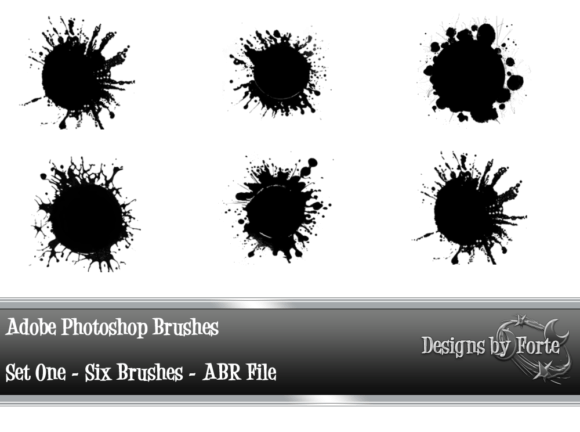
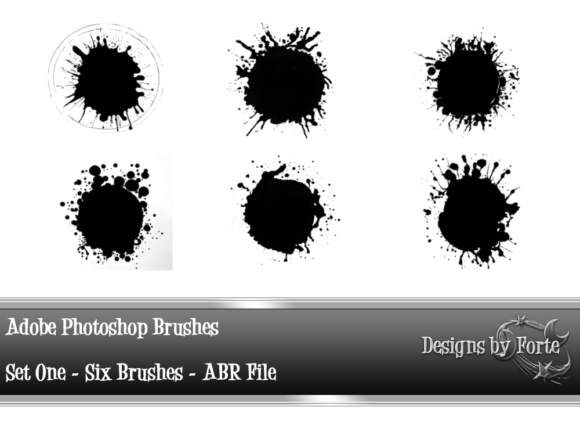
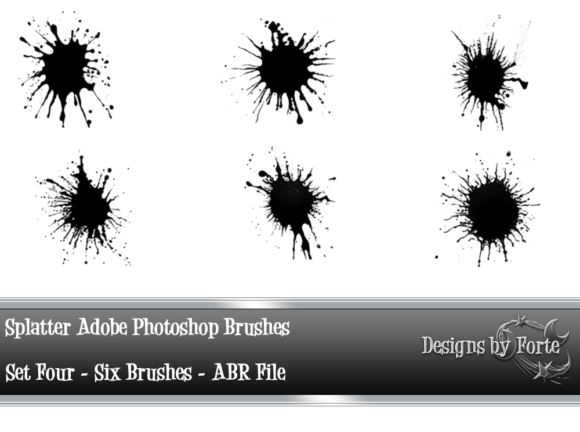
In the expansive ecosystem of digital art tools, custom brush packs serve as essential extensions of a designer’s creative palette. Among these resources, the Adobe Photoshop Abstract Brushes Set 4 stands out as a specialized collection designed to introduce organic, non-linear textures into digital compositions. This set includes six distinct abstract brushes that are compatible with both standard Adobe Photoshop and Photoshop Elements. For designers, illustrators, and photo editors, understanding the specific capabilities and limitations of this toolset is crucial for determining whether it aligns with their workflow requirements.
Understanding the Toolset
The Adobe Photoshop Abstract Brushes Set 4 is not a comprehensive library containing hundreds of variations; rather, it is a curated selection of six high-quality abstract brushes. Each brush is engineered to produce unique stroke characteristics that differ significantly from standard hard-edge or soft-round defaults. The primary function of these brushes is to break the rigidity of digital lines, allowing for the creation of effects that mimic natural media or introduce stylized distortion.
Compatibility is a key feature of this set. It works seamlessly with modern versions of Adobe Photoshop as well as Photoshop Elements, making it accessible to hobbyists and professionals alike. This broad compatibility ensures that users do not need expensive enterprise-level software to utilize the tools effectively, lowering the barrier to entry for beginners exploring abstract design techniques.
Creative Versatility and Application
The value of any brush set lies in its versatility. The six abstract brushes included in Set 4 are designed to be adaptable. Depending on the user’s input pressure, opacity settings, and flow adjustments, these tools can generate a wide spectrum of visual outcomes. Two primary aesthetic directions emerge when utilizing this set:
- Soft and Dreamy Effects: By reducing opacity and using lighter pressure, the brushes can create ethereal, cloud-like textures. This application is particularly useful for background overlays, mood pieces, or adding a subtle atmospheric quality to portrait photography.
- Harsh and Edgy Looks: Conversely, increasing the flow and using decisive, rapid strokes can produce sharp, jagged, and aggressive textures. This approach is ideal for grunge designs, urban-themed artwork, or adding visual tension to a composition.
The core recommendation for users is experimentation. Because abstract brushes rely heavily on the interaction between the tablet stylus (or mouse) and the software’s brush engine, there is no single "correct" way to use them. Users are encouraged to test different brush strokes and settings to discover how each of the six brushes behaves under various conditions.
Benefits of Using Abstract Brush Sets
Integrating the Adobe Photoshop Abstract Brushes Set 4 into a workflow offers several tangible benefits. First, it accelerates the texturing process. Creating complex abstract patterns from scratch using standard tools can be time-consuming. These pre-configured brushes allow artists to achieve intricate results with fewer clicks and less manual manipulation.
Secondly, these brushes help overcome creative blocks. When a design feels too sterile or digital, introducing an abstract element can add warmth and human imperfection. This organic quality often makes digital art feel more tactile and engaging to the viewer. Furthermore, because the set is small and focused, it does not overwhelm the user with choices, allowing for a deeper mastery of each individual brush shape.
Tradeoffs and Considerations
While useful, this toolset is not without limitations. Potential users should consider the following tradeoffs before downloading or purchasing:
- Limited Quantity: With only six brushes, this set may not provide enough variety for large-scale projects requiring diverse textural elements. Designers working on extensive campaigns may find themselves needing to supplement this set with additional libraries.
- Learning Curve: Abstract brushes do not always behave predictably. Achieving the desired effect requires a good understanding of Photoshop’s brush dynamics, such as scattering, angle jitter, and transfer settings. Beginners may initially struggle to control the output.
- Style Specificity: These brushes are tailored for abstract applications. They are not suitable for precise line work, lettering, or realistic rendering. Users looking for general-purpose tools may find this set too niche.
Ideal Use Cases
The Adobe Photoshop Abstract Brushes Set 4 is a strong fit for specific scenarios. It is particularly effective for:
- Digital Collage: Adding blended edges and transitional textures between disparate images.
- Album Artwork and Posters: Creating bold, expressive backgrounds that convey emotion without relying on photographic realism.
- Photo Manipulation: Softening harsh transitions or adding artistic flair to commercial photography.
- Concept Art: Quickly blocking in atmospheric elements like smoke, fog, or energy effects during the early stages of illustration.
In these contexts, the ability to toggle between soft and harsh looks allows the artist to maintain consistency while varying the intensity of the effect.
When to Consider Alternatives
There are situations where alternative tools may be more appropriate. If a project requires highly detailed, realistic textures such as wood grain, fabric, or skin pores, specialized texture brushes or stock photos would be more effective than abstract shapes. Similarly, if a designer needs a vast array of options for varied client work, investing in a larger, multi-category brush bundle might offer better long-term value.
Additionally, users who primarily work with vector graphics in Adobe Illustrator may find limited utility for raster-based Photoshop brushes, unless they are importing textured elements into a mixed-media workflow.
Making the Decision
Deciding whether to incorporate the Adobe Photoshop Abstract Brushes Set 4 into your toolkit depends on your current needs and skill level. If you are looking to add a layer of artistic abstraction to your work and enjoy the process of tweaking settings to achieve unique results, this set offers a solid foundation. Its compatibility with Photoshop Elements makes it an excellent starting point for those not yet committed to the full Creative Cloud suite.
However, if you require precision, speed, or a vast library of ready-made assets, you may need to look toward more comprehensive collections. Ultimately, the best approach is to download the set, if available, and test the six brushes against your typical projects. By experimenting with pressure sensitivity and layer modes, you can determine if these specific abstract forms complement your artistic voice.
For further exploration of digital design tools, consider reviewing tutorials on brush dynamics and layer blending modes to maximize the potential of any new asset you introduce to your workflow.