Charcoal Studio Procreate Brushes: A Practical Review for Digital Artists
Digital art has evolved significantly over the last decade, moving from flat, vector-like illustrations to rich, textured works that mimic traditional media with startling accuracy. For artists who appreciate the raw, expressive quality of dry media, finding the right digital tools is essential. This is where Charcoal Studio Procreate Brushes enters the conversation. It is not merely a collection of presets; it is a specialized toolkit designed to bridge the gap between physical charcoal sticks and the iPad screen.
When evaluating digital brush sets, it is important to look beyond marketing claims and assess functionality, texture fidelity, and workflow integration. This article explores what makes this specific collection distinct, how it compares to other approaches in digital texturing, and whether it fits your artistic needs.
Understanding the Core Value Proposition
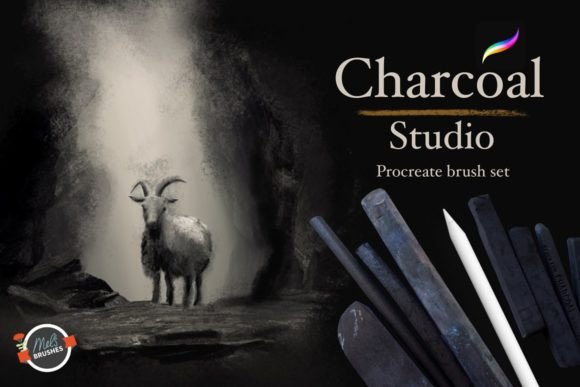
The Charcoal Studio Procreate Brushes collection includes 15 varied brushes, each engineered to replicate specific behaviors of real charcoal. Unlike generic sketching packs that offer a "one-size-fits-all" charcoal effect, this set focuses on the nuances of mark-making. Charcoal is notoriously difficult to digitize because it relies heavily on paper tooth, pressure sensitivity, and the accumulation of dust.
The developers behind this collection have focused on capturing the essence of these physical properties. The brushes are designed to emulate the granular texture of compressed and vine charcoal, allowing for both bold, dramatic strokes and delicate, intricate details. This versatility is crucial for artists who need a single toolset to handle everything from quick gesture drawings to finished, high-contrast portraits.
Key Features and Functionality
- Texture Fidelity: The brushes utilize high-resolution grain maps to simulate the interaction between charcoal particles and paper surface.
- Dynamic Response: Each brush reacts to Apple Pencil pressure and tilt, ensuring that light touches produce faint, dusty marks while heavy pressure yields deep, saturated blacks.
- Blending Capabilities: A common frustration with digital charcoal is the inability to smudge naturally. This collection includes tools specifically designed for blending and smudging, mimicking the use of tortillons or fingers in traditional work.
- Workflow Integration: The brushes are optimized for Procreate’s interface, ensuring minimal lag and intuitive control over opacity and flow.
Comparing Digital Charcoal Approaches
When artists seek to replicate charcoal digitally, they generally face three options: using standard hard-round brushes with texture overlays, purchasing specialized brush sets like Charcoal Studio Procreate Brushes, or using vector-based applications with pattern fills. Understanding the tradeoffs between these methods helps in making an informed decision.
Standard brushes often lack the organic irregularity of real charcoal. They can feel too uniform, requiring the artist to manually add noise or grain in post-production. This adds time to the workflow and can result in a artificial look if not executed carefully. In contrast, specialized sets are pre-engineered to handle this randomness internally.
Another alternative is using photo textures as backgrounds. While this provides immediate visual depth, it can limit flexibility. If you decide to change the lighting or composition later, the static texture may no longer align with your strokes. Brush-based solutions offer dynamic texture that applies only where you draw, providing greater control over the final image.
Strengths and Ideal Use Cases
The primary strength of Charcoal Studio Procreate Brushes lies in its ability to provide an authentic tactile experience. For portrait artists, the capacity to build up layers of tone gradually is invaluable. The brushes allow for soft transitions in skin tones while maintaining the gritty edge characteristic of charcoal portraits.
Landscape artists also benefit from this collection. The varied mark-making styles enable the creation of rough textures for rocks, trees, and shadows without needing complex layering techniques. The hatching and cross-hatching brushes, in particular, are useful for adding structural detail and depth to architectural sketches.
Furthermore, the collection is suitable for artists at various skill levels. Beginners can enjoy the immediate gratification of realistic textures without needing to master complex blending modes. Professionals will appreciate the precision and consistency, which allows them to focus on composition and value rather than fighting the tool.
Limitations and Considerations
While Charcoal Studio Procreate Brushes offers significant advantages, it is not a magic solution for all artistic challenges. Digital charcoal will never perfectly replicate the smell, mess, and physical resistance of real charcoal. Artists transitioning from traditional media may initially find the lack of friction on the glass screen disorienting, regardless of brush quality.
Additionally, the effectiveness of these brushes depends heavily on hardware. To fully utilize the tilt and pressure sensitivity features, users need a compatible Apple Pencil and a relatively recent iPad model. Older devices may struggle with the complex grain calculations, leading to latency issues that disrupt the drawing flow.
It is also worth noting that while the collection covers classic charcoal styles, it may not include every niche technique. Artists who rely on highly experimental or non-traditional mark-making might need to supplement this set with custom brushes or other tools.
Making the Right Choice for Your Workflow
Deciding whether to invest in Charcoal Studio Procreate Brushes requires an honest assessment of your current workflow and artistic goals. If you frequently create monochromatic studies, value-driven paintings, or expressive sketches, this collection is likely a strong fit. The time saved in achieving realistic textures can outweigh the initial cost.
However, if your work is primarily colorful, illustrative, or vector-based, the utility of a charcoal-specific set may be limited. In such cases, a broader all-purpose brush pack might offer better value. Similarly, if you are already satisfied with your current texturing methods—such as using custom grain overlays or third-party blending apps—you may not notice a significant improvement.
Consider also your learning curve. If you are new to Procreate, starting with a specialized set can help you understand how digital tools mimic physical ones. The predefined settings reduce the need for trial-and-error adjustment, allowing you to focus on developing your fundamental skills.
Final Thoughts on Digital Dry Media
The shift toward digital art does not mean abandoning the aesthetic qualities of traditional media. Tools like Charcoal Studio Procreate Brushes demonstrate how technology can enhance rather than replace artistic expression. By offering precise control over blending, shading, and hatching, this collection empowers artists to explore new creative possibilities without the logistical constraints of physical materials.
Ultimately, the best tool is one that disappears into the background, allowing your vision to take center stage. For many artists, this charcoal collection achieves that balance, providing a reliable, versatile, and authentic digital experience. Whether you are a seasoned professional looking to streamline your process or a beginner eager to experiment with dry media effects, evaluating this set against your specific needs is a prudent step in building your digital toolkit.
Before making a purchase, consider downloading trial versions if available, or reviewing user-generated artwork to see the brushes in action. Real-world examples often provide the clearest insight into how well a tool performs under diverse conditions. By taking a measured approach, you can ensure that your investment supports your artistic journey effectively.