30 Elegance Pearl Necklace Brushes for Procreate: A Practical Review for Digital Artists
In the realm of digital illustration, texture and material rendering often distinguish a competent piece from a professional one. Jewelry, particularly pearls, presents a unique challenge due to its complex interplay of light, opacity, and organic irregularity. The 30 Elegance Pearl Necklace Brushes set aims to streamline this specific workflow for users of the Procreate application on iPad. Rather than relying on generic circle stamps or manual shading techniques that can consume hours, this asset pack offers a specialized toolkit designed to replicate the luster and structure of pearl jewelry with greater efficiency.
This review examines the composition, usability, and practical value of these brushes, helping creators determine if they align with their artistic needs and technical workflows.
Understanding the Asset Composition
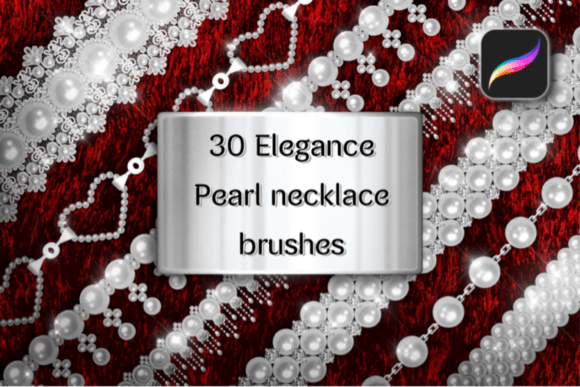
The package is titled "30 Elegance Pearl Necklace Brushes," but a closer inspection reveals a curated selection rather than thirty identical tools. The set is divided into three distinct categories, each serving a different function in the jewelry creation process:
- 26 Various Pearl Necklace Brushes: These are the core tools, offering diverse arrangements and styles of pearls. They range from simple strands to more intricate, layered designs.
- 2 Pearl Brush Stamps: These act as individual elements or accents, useful for adding single pearls or small clusters to existing compositions.
- 2 Sparkling Glitter Brushes: Designed to add highlights and ambient sparkle, enhancing the perceived realism and luxury of the final piece.
This segmentation is logical. By separating the structural necklace brushes from the decorative glitter and stamp elements, the creator allows for a modular approach. Artists can build the base structure of a necklace and then layer additional details without overwriting previous work. This flexibility is crucial for maintaining control over the final aesthetic.
Technical Requirements and Setup
Before evaluating performance, it is essential to address the technical constraints. These brushes are compatible only with the Procreate application for Apple iPad. They will not function in Adobe Photoshop, Clip Studio Paint, or any desktop-based graphic editing software. This limitation is standard for native Procreate brush sets but requires users to have the appropriate hardware ecosystem.
Installation is straightforward, leveraging Procreate’s native import features. Users download the .zip file, preview the contents, and tap the brush file to import it directly into the app. However, the true key to success lies in the configuration. The documentation explicitly states that these brushes require both Primary Color and Secondary Color to be set before use. This dual-color dependency is what allows the brushes to generate depth, shadow, and highlight simultaneously in a single stroke.
Furthermore, for optimal results, Dynamic Brush Scaling must be enabled. Without this setting, the pressure sensitivity may not translate correctly, leading to uniform, flat-looking strokes that lack the organic variation expected in hand-drawn jewelry. Users who skip these setup steps often report poor initial experiences, so adherence to the instructions is not optional—it is fundamental to the tool’s functionality.
Performance and Usability in Real-World Workflows
When properly configured, the 30 Elegance Pearl Necklace Brushes offer a significant advantage in speed and consistency. Drawing realistic pearls manually involves mastering spherical shading, specular highlights, and subsurface scattering. For illustrators working on tight deadlines, such as those creating fashion sketches, editorial illustrations, or character designs, this learning curve can be a bottleneck.
The strength of this set lies in its ability to produce "opaque" and "realistic" results quickly. The brushes handle the heavy lifting of lighting calculations. By adjusting the primary and secondary colors, artists can simulate different lighting environments. For instance, using a warm cream as the primary color and a cool gray as the secondary can mimic indoor ambient light, while high-contrast black and white settings can create dramatic, stylized looks.
However, the term "realistic" should be understood within the context of digital painting. These brushes provide a highly convincing representation of pearls, but they are not photorealistic photographs. They retain a painterly quality that blends well with other Procreate brushes. This makes them ideal for semi-realistic styles, fashion illustration, and concept art where clarity and visual appeal are prioritized over photographic accuracy.
Who Benefits Most from This Tool?
The utility of the 30 Elegance Pearl Necklace Brushes varies depending on the user’s profession and goals. Several groups stand to gain the most:
- Fashion Illustrators and Designers: Speed is critical in fashion sketching. Being able to drag a realistic pearl strand across a neckline saves considerable time compared to drawing each bead individually. It allows designers to focus on garment drape and fabric texture while ensuring accessories look polished.
- Character Artists and Concept Creators: When designing royalty, nobility, or fantasy characters, jewelry is often a key visual signifier. This set provides a quick way to iterate on different necklace styles without getting bogged down in repetitive detailing.
- Digital Planners and Stationery Designers: Creators who sell digital stickers or planner inserts often need elegant, decorative elements. The included glitter brushes and pearl stamps can enhance invitations, headers, and decorative borders with minimal effort.
- Educators and Workshop Leaders: For those teaching digital art, having reliable assets that demonstrate material rendering can help students understand how light interacts with spherical objects. It serves as a practical example of how color theory applies to texture.
Hobbyists who enjoy portrait illustration may also find value here, particularly when adding subtle accessories to subjects. However, casual users who rarely draw jewelry may find the specific nature of the tool less justifiable compared to a general-purpose shape library.
Limitations and Considerations
No tool is without its drawbacks. The primary limitation of the 30 Elegance Pearl Necklace Brushes is its specificity. It is a niche product. If an artist needs to draw diamond rings, gold chains, or gemstone earrings, this set offers no assistance. It is strictly focused on pearls. Therefore, it should be viewed as a complement to a broader library of assets, not a standalone solution for all jewelry needs.
Additionally, the reliance on dual-color settings can be a hurdle for beginners unfamiliar with Procreate’s color dynamics. There is a learning curve involved in understanding how the secondary color affects the shadow side of the pearl. Users expecting a "one-click" solution without any adjustment may be disappointed. The best results require experimentation with color palettes and pressure sensitivity.
Another consideration is the potential for repetition. With 26 necklace brushes, there is variety, but frequent users may notice patterns in the bead arrangements. To maintain uniqueness, artists should combine multiple brushes, rotate canvases, and use the transform tool to adjust perspective. Relying on a single brush stroke for every piece of jewelry will result in a recognizable, cookie-cutter appearance.
Long-Term Value and Verdict
From a value perspective, the 30 Elegance Pearl Necklace Brushes represent a modest investment for a specialized outcome. For professionals who regularly incorporate jewelry into their work, the time saved alone justifies the cost. The ability to produce consistent, high-quality pearl textures reduces revision cycles and enhances client satisfaction.
The inclusion of glitter brushes adds unexpected versatility, allowing for cohesive embellishment beyond just the pearls themselves. This thoughtful addition suggests the creator considered the entire finishing process, not just the base shape.
Ultimately, this set is a robust resource for iPad-based artists seeking to elevate their material rendering capabilities. It is not a magic wand that replaces artistic skill, but rather a sophisticated tool that amplifies efficiency. For those willing to engage with the setup requirements—specifically the dual-color configuration and dynamic scaling—the 30 Elegance Pearl Necklace Brushes deliver a polished, professional result that integrates seamlessly into a modern digital workflow. If your projects frequently call for elegance, opacity, and the distinct luster of pearls, this collection is a worthy addition to your Procreate library.