All the Paper Procreate Brushes Review
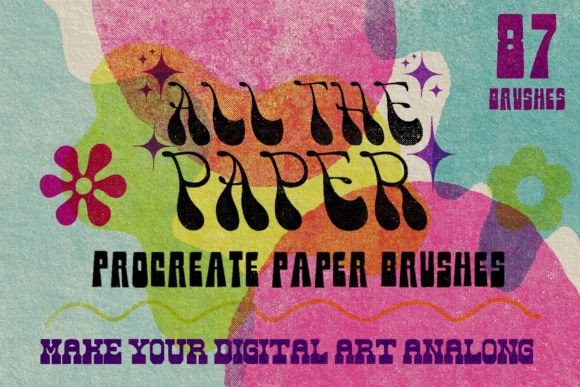
Digital art has evolved significantly over the last decade, moving from flat, sterile vectors to rich, textured compositions that mimic traditional media. For many creators, the missing link between digital convenience and analog warmth is texture. This is where All the Paper Procreate Brushes enters the conversation. Designed specifically for iPad users, this collection aims to bridge the gap between screen and surface, offering a comprehensive solution for artists who want their work to feel tangible.
The core promise of this set is simplicity and versatility. With 87 distinct brushes, it covers a wide spectrum of paper types, from delicate watercolor sheets to rugged, crumbled Kraft paper. But beyond the sheer number of options, the real value lies in how these tools integrate into a professional workflow, saving time while enhancing the visual depth of illustrations, designs, and digital journals.
Why Texture Matters in Digital Design
In a saturated digital landscape, clean lines and perfect gradients are everywhere. While technically impressive, they can sometimes feel cold or impersonal. Adding paper texture introduces organic imperfections—grain, fiber, and subtle irregularities—that human eyes naturally find appealing. It adds a layer of authenticity that can make a brand logo feel more artisanal, a social media post more engaging, or a digital painting more emotive.
All the Paper Procreate Brushes addresses this need by providing textures that react dynamically to your canvas. Unlike static overlays that require complex masking, these brushes allow you to paint texture directly onto your work. This interactivity gives you control over density and placement, ensuring the texture enhances rather than overwhelms your primary subject matter.
Versatility Across Light and Dark Backgrounds
One of the most frustrating aspects of using texture brushes is compatibility with different color schemes. Many texture sets only work well on white or light backgrounds, forcing designers to create separate files for dark mode or night-themed projects. This set solves that problem elegantly. Each of the 87 textures includes both a light and a dark version.
This dual-version approach means you can maintain consistency in your artistic style regardless of the background color. Whether you are designing a minimalist white invoice for a client or a moody, dark-themed poster for an event, the paper effect remains cohesive. This feature alone can cut down editing time significantly, as you no longer need to invert layers or adjust opacity manually to make a texture visible against contrasting backgrounds.
A Comprehensive Library of Paper Types
The variety within All the Paper Procreate Brushes ensures that there is a suitable option for nearly any project type. The collection is not limited to standard copy paper; it explores the nuances of physical media. You will find:
- Watercolor papers: Ideal for soft, fluid illustrations and gentle backgrounds.
- Natural and handmade papers: Perfect for eco-friendly branding or organic aesthetic projects.
- Kraft papers: Excellent for rustic designs, packaging mockups, and vintage-style graphics.
- Folded and crumbled papers: These add dramatic depth and a sense of history or wear to your composition.
- Vintage papers: Great for nostalgia-driven content or historical storytelling.
This breadth allows educators to create engaging handouts that look like printed materials, marketers to design social media assets that stand out in a feed of polished photos, and hobbyists to elevate their digital journaling entries. The inclusion of unique and specialized papers means you are less likely to need multiple third-party packs to cover different project requirements.
Streamlining Your Workflow with Templates
For those new to texturing, the learning curve can be steep. Knowing which blend mode to use—Multiply, Overlay, Screen, or Soft Light—can be trial and error. To mitigate this, the creator of All the Paper Procreate Brushes includes a helpful template. This resource demonstrates exactly how the brushes are used in practice and highlights recommended blend modes for different effects.
This educational component is particularly valuable for freelancers and small business owners who may not have formal training in graphic design. Instead of spending hours experimenting with settings, you can refer to the template to achieve professional results quickly. It transforms the brush set from a simple tool into a guided system, helping users understand the logic behind effective texturing.
Who Benefits Most from This Set?
While any iPad artist can benefit from high-quality textures, certain groups will find specific advantages:
- Digital Illustrators: Those looking to add a traditional feel to their portfolio without scanning physical paper.
- Small Business Owners: Entrepreneurs creating product labels, thank-you cards, or packaging designs that need a tactile appeal.
- Educators and Publishers: Professionals designing worksheets, e-books, or presentation slides that benefit from a readable, paper-like background.
- Social Media Managers: Creators needing quick, eye-catching backgrounds for quotes or announcements that break the monotony of solid colors.
The key benefit for all these users is efficiency. By having a reliable, go-to library of textures, you reduce decision fatigue. You know that if you need a rustic look, the Kraft paper brushes are ready. If you need elegance, the watercolor textures are available. This reliability supports consistent output, which is crucial for building a recognizable brand or artistic style.
Important Compatibility Considerations
It is essential to note that All the Paper Procreate Brushes is exclusively compatible with Procreate on iOS. This means you need an iPad and the Procreate app to use these tools. They will not work with Photoshop, Procreate Pocket on iPhone, or other desktop illustration software. Before purchasing, ensure your workflow is centered around the iPad ecosystem. If you frequently switch between desktop and tablet, you may need to consider how these assets fit into your broader pipeline, perhaps by exporting textured layers for further editing elsewhere.
Additionally, while the set is extensive, the "best" texture is always subjective. What works for a vintage book cover may not suit a modern tech blog header. Users should take time to experiment with the included template to understand how each paper type interacts with their specific color palettes and line weights.
Final Thoughts on Enhancing Digital Art
Adding texture is often the final step that transforms a good digital piece into a great one. All the Paper Procreate Brushes offers a robust, well-thought-out solution for this need. By providing both light and dark variants, a wide variety of paper types, and educational resources, it removes many of the technical barriers associated with digital texturing.
For creators looking to infuse their work with warmth, character, and a touch of the analog world, this set provides a practical and efficient toolkit. It allows you to focus more on creativity and less on technical troubleshooting, ultimately helping you produce work that resonates more deeply with your audience. Whether you are drafting a quick sketch or finalizing a client project, having the right paper texture at your fingertips can make all the difference in the final presentation.