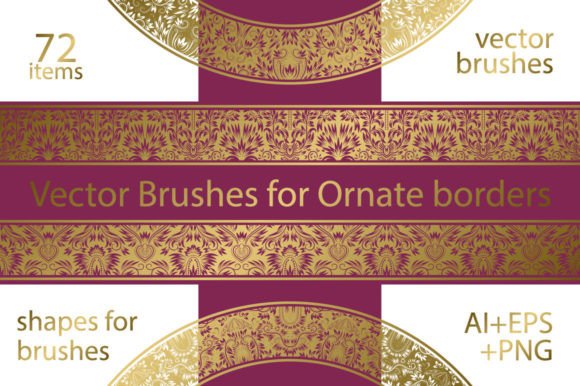
72 Ornate Vector Brushes for Vintage Design
Creating intricate, vintage-style frames and borders often requires hours of manual drawing or expensive custom illustration work. For designers, marketers, and hobbyists who need high-quality decorative elements without the steep learning curve, 72 Ornate Vector Brushes offers a practical and efficient solution. This collection is specifically designed to streamline the process of adding elegant, classical details to digital projects, whether you are working on a wedding invitation, a book cover, or a brand identity package.
The core appeal of this package lies in its versatility and ease of use. It includes seventy-two unique vector brushes focused on ornate borders, allowing users to generate complex patterns with simple strokes. Instead of placing individual elements one by one, you can paint these designs directly onto your canvas, adjusting size and spacing as needed. This approach saves significant time while maintaining the precision and scalability that only vector graphics can provide.
Understanding the Package Contents
To get the most out of this resource, it is helpful to understand exactly what is included in the archive. The package is structured to accommodate different software versions and workflow preferences. It contains three primary file types, ensuring compatibility across various design environments:
- 6 AI Files (AI CC): These files contain twelve brushes each, totaling seventy-two brushes optimized for Adobe Illustrator Creative Cloud. If you have AI CC, you can load these directly into your brush panel and start creating vector borders immediately.
- 6 EPS Files (EPS 10): For users with older versions of Illustrator or other vector software that supports EPS 10, there are six files containing twelve patterned shapes each. These can be used to create custom brushes or placed as standalone decorative elements.
- 72 PNG Files: Each brush design is also provided as a high-resolution PNG image (1667 x 1000 pixels) with a transparent background. These are ideal for non-vector applications like Photoshop, Canva, or web design tools where drag-and-drop functionality is preferred.
This multi-format approach ensures that whether you are a professional vector artist or a social media manager using basic graphic tools, you can access the ornate designs in a way that fits your technical setup.
Why Choose Vector Borders for Your Projects?
Vector graphics differ from standard raster images because they are based on mathematical paths rather than pixels. This means you can scale a border from the size of a business card to a billboard without any loss in quality. When using 72 Ornate Vector Brushes, you retain full control over stroke weight, color, and dimensions. This flexibility is crucial for professional work where consistency across different media formats is required.
Moreover, ornate borders evoke a sense of tradition, luxury, and craftsmanship. They are particularly effective in industries such as hospitality, fashion, publishing, and event planning. By integrating these vintage frames into your designs, you can instantly elevate the perceived value of your content. A simple text block becomes an announcement; a plain photo turns into a featured highlight.
Practical Applications and Use Cases
The utility of these brushes extends far beyond simple decoration. Here are several realistic scenarios where these ornate elements can solve specific design challenges:
Wedding and Event Stationery
Couples and event planners often seek classic aesthetics for invitations, save-the-dates, and menus. Using the AI CC brushes, you can quickly draft custom frame layouts that match the theme of the event. The ability to tweak the curvature and thickness of the border allows for perfect alignment with typography, ensuring a cohesive look.
Product Packaging and Labels
Small business owners selling artisanal goods, such as candles, soaps, or gourmet foods, can use these borders to create premium-looking labels. The EPS files allow for precise integration into packaging templates, helping products stand out on shelves with a touch of vintage elegance.
Digital Marketing and Social Media
For bloggers and marketers, the PNG files are invaluable. You can drop these transparent backgrounds directly into Instagram posts, Pinterest pins, or Facebook ads to frame quotes, product shots, or testimonials. This adds visual interest without requiring advanced editing skills.
Educational and Editorial Design
Educators creating worksheets or certificates can use these borders to give documents a formal, official appearance. Similarly, writers self-publishing eBooks or print books can utilize the vector shapes to design chapter headers or title pages that reflect a historical or literary tone.
Getting Started: Tips for Beginners
If you are new to using brush libraries, the process might seem intimidating at first. However, with 72 Ornate Vector Brushes, the workflow is straightforward. For Adobe Illustrator CC users, simply open the Brush panel, navigate to the library menu, and select the provided AI files. Once loaded, select the Brush Tool, choose your desired ornate style, and draw a path. The brush will automatically repeat the pattern along the stroke.
For those using other software, import the EPS shapes and define them as art brushes or pattern brushes according to your program’s instructions. If you are working in raster-based programs like Photoshop, use the PNG files. Since they have transparent backgrounds, you can layer them easily over photos or colored backgrounds without worrying about white boxes appearing around the edges.
A key consideration when using these brushes is balance. Ornate designs are detailed and visually heavy. To avoid clutter, pair them with clean, simple typography and ample white space. Let the border frame the content rather than compete with it. Experiment with opacity and color overlays to soften the impact if the black default vectors feel too stark for your palette.
Maximizing Value and Creativity
While the preset brushes offer immediate results, do not hesitate to modify them. Change the colors to match your brand guidelines, adjust the stroke width to fit different layout constraints, or combine multiple brushes to create unique composite frames. The vector nature of the files means you can ungroup and edit individual anchor points if you need to customize a specific corner or flourish.
Additionally, consider the psychological impact of your design choices. Vintage frames suggest reliability and heritage. If you are building a brand that wants to communicate trust and longevity, these ornate elements can reinforce that message subconsciously. Conversely, if your brand is ultra-modern and minimalist, use these brushes sparingly as accent pieces rather than dominant features.
In conclusion, 72 Ornate Vector Brushes is more than just a set of decorative assets; it is a toolkit for enhancing visual communication. By providing high-quality, scalable, and versatile design elements, it empowers creators of all skill levels to produce polished, professional-grade work efficiently. Whether you are crafting a single invitation or developing a comprehensive brand identity, these brushes offer the detail and elegance needed to make your designs memorable.