8 Fur Photoshop Brushes for Digital Art
Digital illustration often hinges on texture. The difference between a flat, lifeless character design and one that feels tactile and alive frequently comes down to how well you render organic surfaces. This is where specialized tools become indispensable. The 8 Fur Photoshop Brushes collection offers a streamlined solution for artists who need to add realistic or stylized hair and fur without spending hours painting individual strands. Whether you are designing a fierce wolf for a fantasy novel cover or adding soft texture to a cute mascot for a children’s book, these brushes provide the foundational strokes needed to achieve professional results efficiently.
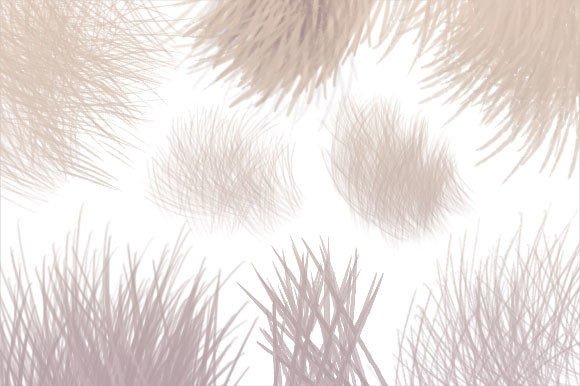
Beyond the immediate utility of the brush tips, this package includes an awesome added element that expands your creative toolkit significantly. You receive not only the standard Photoshop abr brush file but also eight Paint Shop Pro psp files and a transparent PNG image pack. This versatility ensures that regardless of your preferred software or workflow, you can integrate high-quality fur textures into your projects seamlessly. From decorating amazing paintings and t-shirts to crafting intricate graphics, digital art, and stickers, these resources adapt to whatever your heart desires.
Understanding the Versatility of Fur Textures
Fur is rarely just one thing. In nature, it varies from the sleek, wet look of an otter to the fluffy, chaotic volume of a Pomeranian. The 8 Fur Photoshop Brushes are designed with this variation in mind. Each brush in the set targets a specific type of hair behavior, allowing you to layer them for complex effects. For instance, you might use a coarse, stiff brush to establish the underlying structure of a beast’s mane, then overlay a softer, finer brush to create the halo of light catching the tips.
This layered approach is crucial for maintaining realism. When you rely on a single brush type, the result can look repetitive and artificial. By combining different stroke styles, you mimic the natural irregularity of animal coats. This technique is equally valuable for stylized art. Even in cartoonish or semi-realistic designs, varying the texture adds depth and visual interest, preventing the artwork from appearing flat or overly digital.
Creative Applications Across Industries
The utility of these brushes extends far beyond traditional character illustration. Marketers and small business owners can leverage these tools to create eye-catching social media graphics. Imagine a promotional post for a pet care brand featuring a dog with impeccably rendered fur, or a cozy winter campaign using textured fur borders to evoke warmth. These subtle details capture attention and convey quality, helping brands stand out in crowded feeds.
For entrepreneurs selling print-on-demand products, such as t-shirts and stickers, high-resolution textures are essential. The included transparent PNG image pack is particularly useful here. You can drag and drop these pre-rendered fur elements directly into your design software, adjusting colors and blending modes to match your product theme. This saves time during the production phase, allowing you to iterate on designs quickly and respond to market trends without starting from scratch every time.
Educators and hobbyists will also find value in the accessibility of these tools. Teaching digital painting concepts like flow, opacity, and pressure sensitivity becomes easier when students have reliable brushes that respond predictably. Instead of struggling to create a believable texture from a basic round brush, learners can focus on composition and color theory, using the fur brushes to execute their vision with confidence.
Maximizing the Included File Formats
One of the standout features of this package is its compatibility. While many brush sets are exclusive to Adobe Photoshop, this collection acknowledges the diverse ecosystem of digital art tools. The inclusion of eight Paint Shop Pro psp files ensures that users of this powerful alternative software are not left behind. Paint Shop Pro has a loyal following among photographers and graphic designers who prefer its interface and feature set. Having native support means you retain full control over brush dynamics, such as size jitter and scattering, within your preferred environment.
The transparent PNG image pack serves a different but equally important purpose. These images are ready-to-use assets that can be imported into virtually any graphic design program, including web-based tools like Canva or professional suites like Affinity Designer. This makes the collection ideal for collage artists, scrapbookers, and web designers who may not use dedicated painting software. You can use these PNGs as masks, overlays, or standalone decorative elements, adding a touch of organic texture to clean, geometric layouts.
Techniques for Realistic and Stylized Results
To get the most out of the 8 Fur Photoshop Brushes, consider your lighting and directionality. Fur always grows in a specific direction, and it reacts to light based on its volume. Start by blocking in the general shape of your subject using a large, soft brush. Then, switch to the fur brushes to define the flow. Work in layers, keeping the base layer darker and adding lighter highlights on top. This method builds volume and prevents the fur from looking like a solid mass.
For stylized art, do not be afraid to exaggerate. Use the brushes to create sharp, graphic clumps of fur rather than trying to simulate every individual hair. This approach works well for logos, icons, and modern illustration styles where clarity and impact are more important than photorealism. Adjust the opacity and flow settings to blend the strokes smoothly, creating a cohesive look that feels intentional rather than accidental.
Consistency is key when working on larger projects. If you are illustrating a series of characters or a comic, establish a standard set of brush settings for fur early on. Save these presets so that every character shares a similar textural language. This creates a unified visual style that strengthens the overall narrative and professional appeal of your work.
Enhancing Your Workflow with Organization
Managing digital assets can become overwhelming as your library grows. To keep your results clear and organized, create a dedicated folder for these fur resources. Label your layers clearly in your working files, such as "Base Fur," "Highlight Strands," and "Shadow Details." This non-destructive workflow allows you to tweak individual elements without affecting the rest of the illustration. It also makes collaboration easier, as other designers can understand and edit your file structure if needed.
Experiment with blending modes to integrate the fur textures seamlessly. Modes like Overlay, Soft Light, and Multiply can help the fur interact with the underlying colors and shadows of your artwork. This integration is what transforms a simple brush stroke into a believable part of the image. Take time to test these modes with different color palettes to see how they affect the mood and depth of your piece.
Ultimately, the 8 Fur Photoshop Brushes are more than just a set of tools; they are a catalyst for creativity. They remove the technical barrier of rendering complex textures, freeing you to focus on storytelling and design. Whether you are a seasoned professional looking to speed up your workflow or a beginner eager to explore digital painting, this collection provides the flexibility and quality needed to bring your ideas to life. Embrace the versatility of the included formats, experiment with different styles, and let these brushes help you create art that resonates with your audience.