Procreate Gingerbread Creator Brushes
The holiday season brings a unique set of demands for digital creators. Whether you are designing social media graphics for a small business, illustrating a children’s book, or crafting personalized greeting cards, the pressure to produce fresh, festive content is real. This is where specialized tools become invaluable. The Procreate Gingerbread Creator Brushes offer a streamlined solution for artists who want to capture the warmth and whimsy of the season without starting from scratch. This collection is not just a bundle of stamps; it is a comprehensive toolkit designed to help you build cohesive, professional-grade gingerbread-themed illustrations and patterns with remarkable speed.
What Makes This Brush Set Essential?
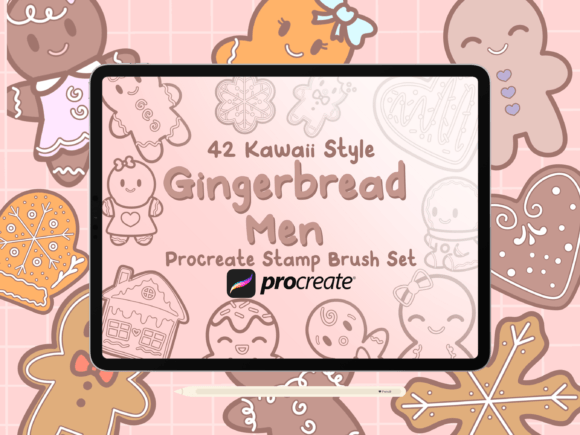
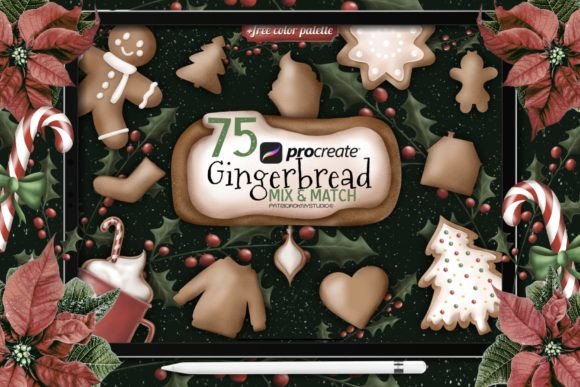
At its core, this package provides 75 hand-drawn Procreate brushes in a convenient .brushset format. But the true value lies in how these tools are categorized to mimic the actual process of decorating cookies. Instead of forcing you to draw every sprinkle or drip manually, the set breaks down the visual elements of gingerbread art into manageable components. You receive five distinct icing brushes that simulate different consistencies, from thick royal icing outlines to thinner flood fills. These are complemented by three cookie texture brushes that add that crucial baked realism, ensuring your digital creations don’t look too flat or plastic.
Beyond the basics, the inclusion of eight decoration brushes allows for intricate detailing. Think piped swirls, dots, and drizzles that would otherwise take minutes to perfect by hand. For background work or surface design, the twenty Christmas pattern brushes provide instant repeatability, while the thirty-nine gingerbread stamp brushes offer a library of characters and shapes ready to be placed and customized. Coupled with a curated gingerbread color palette, this set removes the guesswork from color theory, providing warm browns, vibrant reds, and snowy whites that harmonize perfectly.
Streamlining Your Creative Workflow
For professional illustrators and freelance designers, time is often the most scarce resource. Using generic brushes to create holiday-themed assets can be inefficient. You might spend hours tweaking opacity settings to get the right "icing" look or searching for reference images for cookie textures. With Procreate Gingerbread Creator Brushes, those steps are condensed into simple strokes. The brushes are optimized for pressure sensitivity, meaning they respond naturally to your Apple Pencil movements. This responsiveness allows for organic variation in line weight, which is critical for achieving that hand-drawn, artisanal feel that audiences love during the holidays.
Consider the efficiency gains when creating seamless patterns. The twenty Christmas pattern brushes are particularly useful for surface designers who need to generate wrapping paper, textile prints, or digital backgrounds. Instead of drawing each element individually and arranging them manually, you can paint with these brushes to create complex, repeating motifs quickly. This capability significantly boosts productivity, allowing you to take on more client projects or dedicate more time to refining your creative concepts rather than executing repetitive tasks.
Practical Applications Across Industries
The versatility of this brush set extends far beyond personal hobby projects. Here is how different professionals can leverage these tools:
- Social Media Managers and Marketers: Create eye-catching story templates, post headers, and promotional graphics for holiday sales. The gingerbread stamps can be used to frame text or highlight key dates, adding a festive touch that increases engagement.
- Educators and EdTech Creators: Develop engaging worksheets, classroom decorations, or interactive digital lessons. The friendly, approachable style of gingerbread illustrations appeals to younger students, making learning materials more inviting during the winter months.
- Small Business Owners: Design custom packaging labels, thank-you cards, or email newsletter headers. A cohesive visual theme helps strengthen brand identity, and using a dedicated brush set ensures consistency across all your marketing materials.
- Print-on-Demand Sellers: Generate designs for t-shirts, mugs, and tote bags. The high-resolution nature of Procreate brushes means your artwork will scale well for various products, and the unique hand-drawn aesthetic can help your items stand out in crowded marketplaces.
Enhancing Brand Communication Through Visual Warmth
In marketing and branding, emotion drives connection. Gingerbread imagery is universally associated with comfort, nostalgia, and celebration. By incorporating these visuals into your digital communications, you tap into those positive associations. The Procreate Gingerbread Creator Brushes allow you to control the tone of this messaging. Want something playful and chaotic? Use the splatter and drip brushes. Prefer something elegant and refined? Stick to the precise piping tools and subtle textures. This level of control ensures that your visual language aligns with your brand voice, whether it is quirky and fun or sophisticated and traditional.
Moreover, the included color palette simplifies the decision-making process. Choosing colors that evoke the right mood can be challenging, especially under tight deadlines. This pre-selected palette ensures that your reds are festive but not jarring, and your browns are rich and appetizing. This attention to detail enhances the overall user experience for your audience, making your content visually pleasing and easy to digest.
Tips for Getting the Most Out of Your Brushes
To maximize the potential of this toolset, consider integrating it into your existing workflow strategically. Start by experimenting with layer blending modes. For instance, placing a texture brush on a multiply layer over a solid color base can create depth and realism that mimics actual baked goods. Don’t be afraid to combine the stamp brushes with the icing tools. A stamped gingerbread man becomes unique when you add custom icing details using the piping brushes.
It is also worth noting that while these brushes are specialized, they are flexible. You can adjust size, opacity, and spacing in Procreate to suit your specific canvas dimensions. For larger formats like posters or banners, increase the brush size and reduce spacing for smoother lines. For intricate icons or stickers, keep the settings default for crisp, detailed results.
When evaluating digital assets, always consider usability and long-term value. This set scores high on both fronts because it addresses a specific seasonal need with comprehensive coverage. It eliminates the friction of hunting for individual elements and provides a unified aesthetic. For anyone looking to elevate their holiday design game, investing in a specialized tool like this is a practical step toward higher quality output and greater creative satisfaction.
Ultimately, the goal of any creative tool is to remove barriers between your idea and its execution. Procreate Gingerbread Creator Brushes do exactly that by handling the technical intricacies of texture and pattern, freeing you to focus on composition and storytelling. Whether you are a seasoned pro or a passionate hobbyist, this set offers the resources needed to create memorable, heartwarming illustrations that resonate with audiences during the most wonderful time of the year.