Mastering Metallic Detail: A Deep Dive into Magic Chain Brushes Vol.1 for Procreate
In the rapidly evolving landscape of digital illustration, efficiency and realism are no longer mutually exclusive goals. For concept artists, fashion designers, and hobbyist illustrators alike, the ability to render complex textures quickly can define the difference between a stagnant workflow and a dynamic creative process. Among the most challenging textures to master digitally is metal—specifically, the intricate interplay of light, shadow, and reflection found in jewelry. This is where specialized tools like Magic Chain Brushes Vol.1 for Procreate become indispensable assets rather than mere shortcuts.
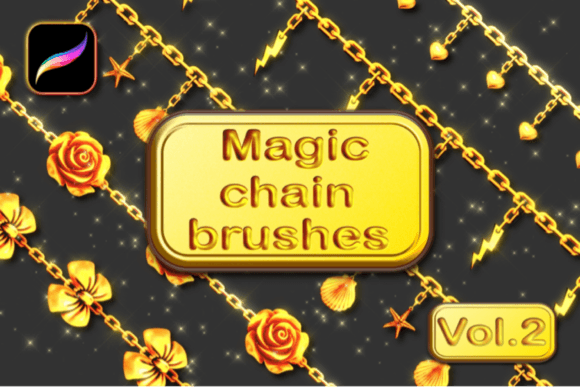
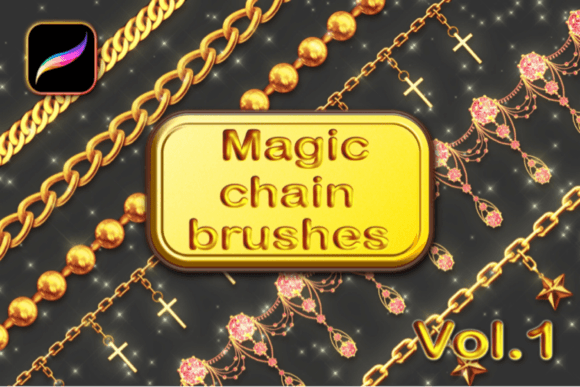
The demand for high-quality digital assets has surged as more creators transition from traditional media to iPad-based workflows. The expectation for polished, professional-grade output has risen across industries, from indie game development to social media content creation. Within this context, brush sets designed for specific materials address a critical gap in standard toolkits. While basic round brushes can sketch a shape, they rarely capture the nuanced opacity and reflective qualities of gold, silver, or platinum without hours of manual blending. The Magic Chain Brushes Vol.1 set offers a streamlined solution, providing artists with a new experience to draw many different styles of chain necklaces that are opaque, realistic, and fully color-changeable using Gradient Maps.
The Shift Toward Specialized Digital Tools
Historically, digital artists relied on generic brush packs that offered variety in stroke texture but lacked material specificity. As the Procreate ecosystem has matured, users have begun seeking tools that understand the physics of the subjects they depict. This shift reflects a broader trend in creative software: the move from general-purpose tools to specialized, context-aware assets. Creators are no longer satisfied with simulating paint; they want to simulate materials.
This evolution is driven by changing user expectations. Audiences on platforms like Instagram and Pinterest have become visually literate, able to distinguish between flat, cartoonish renders and those with depth and physical presence. For professionals, this means that rendering jewelry realistically is no longer a niche skill reserved for high-end advertising agencies. Freelancers and small business owners creating product mockups or character designs need accessible ways to achieve this level of fidelity. The 15 Magic chain brushes vol.1 for Procreate App respond directly to this need, offering a bridge between technical precision and artistic freedom.
Breaking Down the Toolkit: What You Actually Get
Understanding the utility of any digital asset requires a close look at its components. This particular set is curated to cover the most common requirements for jewelry illustration. It includes 13 various chain brushes, each designed to mimic different link styles, from delicate curb chains to heavier rope links. Additionally, the pack includes 2 sparkling glitter brushes, which add essential highlights and ambient occlusion effects that bring metallic surfaces to life.
Beyond the brushes themselves, the package includes educational support: a quick tutorial in PDF file format and a video tutorial available on the creator’s YouTube channel. This inclusion is significant. Many users struggle not with the lack of tools, but with the lack of knowledge on how to integrate them into their existing workflow. By providing clear instructions, the creator ensures that users can immediately apply the brushes effectively, reducing the learning curve and enhancing the overall user experience.
Technical Nuances: Color, Opacity, and Workflow
One of the standout features of these brushes is their compatibility with Procreate’s Gradient Map adjustment. This functionality allows artists to change the color of the chains instantly without repainting. Whether you need rose gold, oxidized silver, or bright yellow gold, the underlying structure of the brush stroke remains intact while the hue shifts dynamically. This non-destructive approach is vital for modern digital workflows, where iteration speed is key.
However, achieving the best results requires attention to technical settings. The documentation notes that these brushes need to be set to Primary Color and Secondary Color before use. This dual-color setup is what creates the illusion of three-dimensionality, with one color representing the highlight and the other the shadow. Furthermore, for optimal performance and visual consistency, users are advised to always turn Dynamic brush scaling on. This setting ensures that the brush stroke adjusts smoothly to pressure and tilt, maintaining the integrity of the chain links regardless of the stroke speed or size.
It is crucial to note that these brushes are compatible ONLY with Procreate application for Apple iPad. They will not work with Adobe Photoshop, Clip Studio Paint, or any other graphic editing software. This limitation is due to the proprietary brush engine Procreate uses, which handles double-color stamps and specific blending modes differently than desktop applications. Users must ensure they are working within the correct ecosystem to avoid frustration.
Practical Applications for Modern Creators
The versatility of the Magic Chain Brushes Vol.1 extends beyond simple jewelry illustration. Fashion designers can use these tools to quickly visualize accessories on character sketches, allowing for faster client approvals and design iterations. Concept artists for games and films can populate characters with realistic gear without spending excessive time on repetitive details. Even marketers and bloggers creating lifestyle graphics can benefit from the added polish these brushes provide to promotional images.
Consider the workflow of a freelance illustrator tasked with creating a series of portrait commissions. Traditionally, adding detailed jewelry might add hours to the project timeline. With these brushes, the same result can be achieved in minutes, freeing up time for other aspects of the illustration, such as facial expressions or background elements. This efficiency translates directly into better profit margins for freelancers and faster turnaround times for agencies.
Installation and Setup Guide
Getting started with the brush set is straightforward, but following the correct steps ensures a smooth integration into your library. Here is the standard procedure for installing the files:
- Download the .zip file from your purchase confirmation or account dashboard.
- Locate the downloaded file on your iPad. Go to the .zip file and tap to preview the content.
- Inside the archive, you will see the brushes file (usually with a .brushset extension).
- Click on the file. Procreate should automatically launch and import the brushes into your current brush library.
- Once imported, create a new layer and select the desired chain brush.
- Set your Primary and Secondary colors in the color disc before drawing.
- Ensure Dynamic brush scaling is enabled in your brush settings for the best result.
This seamless installation process underscores the user-friendly nature of the Procreate platform. Unlike desktop software that may require complex folder navigation or plugin management, iPad-based tools prioritize immediacy and ease of use.
Why Realism Matters in Digital Art
The push toward realism in digital tools is not about abandoning style; it is about expanding the artist’s vocabulary. Even stylized or semi-realistic art benefits from accurate lighting and texture cues. When a chain necklace looks physically plausible, it grounds the character or object in a believable space. This attention to detail enhances the viewer’s immersion and trust in the artwork.
Moreover, as augmented reality (AR) and virtual try-on technologies become more prevalent in e-commerce, the ability to create realistic digital assets becomes increasingly valuable. Artists who master these tools today are positioning themselves for future opportunities in immersive media. The skills developed using specialized brushes like these translate well into 3D modeling and texturing workflows, where understanding light interaction on metallic surfaces is fundamental.
In conclusion, the Magic Chain Brushes Vol.1 for Procreate represent more than just a collection of stamps. They are a thoughtful response to the growing demand for efficiency and quality in digital illustration. By combining realistic textures with flexible color options and clear instructional support, this set empowers creators to elevate their work without sacrificing their unique artistic voice. Whether you are a seasoned professional or an enthusiastic hobbyist, integrating these tools into your workflow can unlock new possibilities in your creative practice.