Mastering Digital Metalwork: A Guide to Procreate Chain Jewelry Necklace Brushes
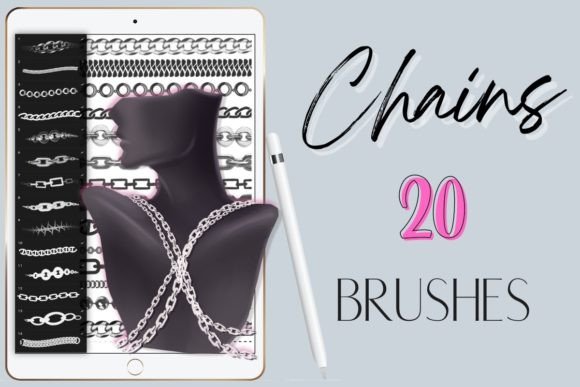
The intersection of traditional craftsmanship and digital illustration has opened new avenues for jewelry designers, fashion illustrators, and concept artists. Among the most intricate elements to render by hand are metallic chains, which require a keen understanding of light, reflection, and structural continuity. For creators working within the iPad ecosystem, specialized tools have emerged to streamline this complex process. Specifically, Procreate Chain Jewelry Necklace Brushes offer a sophisticated solution for rendering realistic metal links without the tedious manual drawing of every individual segment. This comprehensive guide explores the functionality, application, and artistic value of these digital assets, focusing on a curated set of twenty realistic chain brushes designed to enhance workflow efficiency and visual fidelity.
The Mechanics of Digital Chain Rendering
Understanding how these brushes function is essential for maximizing their potential. Unlike standard stamp brushes that simply place a static image on the canvas, high-quality chain brushes are engineered to respond dynamically to user input. The core feature of this specific collection is pressure sensitivity. When using an Apple Pencil or a compatible stylus that supports pressure data, the brush alters its output based on how hard the artist presses against the screen. This capability allows for variable line weights, opacity changes, and subtle shifts in texture, mimicking the natural variations found in physical metalwork.
It is crucial to note that these are exclusively digital tools designed for the Procreate application on iPad. They will not function in other software environments such as Photoshop, Clip Studio Paint, or desktop-based illustration programs. This specificity ensures that the brushes are optimized for the touch interface and the unique rendering engine of Procreate, providing a seamless experience for users who have committed to this platform. The package typically arrives as a single zip file containing twenty distinct brush presets, each calibrated to represent different types of chains, from delicate cable links to robust curb chains.
Diverse Applications Across Creative Industries
The utility of Procreate Chain Jewelry Necklace Brushes extends far beyond simple accessory design. Various professional and hobbyist sectors can leverage these tools to enhance their visual communication and artistic output.
Fashion Illustration and Design
In the fast-paced world of fashion, speed and accuracy are paramount. Illustrators often need to convey the weight and drape of accessories quickly. Using these brushes, a designer can sketch a handbag strap or a statement necklace in seconds, allowing them to focus more on the garment's silhouette and fabric texture. The realistic rendering helps clients and manufacturers visualize the final product more accurately than a rough schematic would allow.
Concept Art for Gaming and Film
Character designers frequently need to equip protagonists and antagonists with detailed armor and accessories. Chains are a common motif in fantasy and sci-fi genres, appearing as part of armor plating, weapon hilts, or ceremonial regalia. The twenty varied brushes in this set allow artists to differentiate between the rusted iron chains of a dungeon crawler and the polished gold links of a royal courtier. This variety adds depth to character storytelling through visual details.
Product Visualization for E-Commerce
Jewelry makers who sell handmade items online often need high-quality images for their listings. While photography is standard, digital mockups allow for rapid experimentation with different chain styles before physical production. Artists can create lifelike representations of custom orders, helping customers visualize personalized pieces. The pressure-sensitive nature of the brushes allows for the creation of shadows and highlights that give the digital chain a three-dimensional appearance, enhancing the perceived value of the product.
Technical Considerations and Workflow Integration
To achieve the best results with these tools, artists must understand the technical requirements and optimal workflows. Since the brushes rely on pressure sensitivity, the choice of stylus is critical. The Apple Pencil remains the gold standard for Procreate users due to its low latency and precise pressure curve. However, third-party styluses that explicitly support pressure sensitivity can also be effective, though users may need to adjust settings within the app to match their preferred responsiveness.
The installation process is straightforward but requires attention to detail. Users receive a zip file containing the brush set. After downloading, the file must be unzipped, and the individual brush files imported into Procreate. Once installed, the brushes appear in the user’s library, ready for immediate use. It is advisable to organize these brushes into a dedicated group within Procreate to keep the workspace tidy and accessible during complex projects.
One significant advantage of using a set of twenty different brushes is the ability to mix and match styles within a single piece. A necklace might feature a heavy clasp made with a thick link brush, transitioning into a finer chain for the main body. By layering different brushes, artists can create composite designs that look bespoke and intricate. Furthermore, because these are digital layers, mistakes are easily corrected. Unlike ink on paper, a misplaced chain link can be erased or adjusted without damaging the rest of the artwork, encouraging experimentation and refinement.
Enhancing Realism Through Layering and Effects
While the brushes provide a strong foundation, achieving photorealistic results often requires additional techniques. The base stroke provided by the Procreate Chain Jewelry Necklace Brushes establishes the form, but lighting and material properties bring it to life. Artists should utilize Procreate’s blending modes to add specular highlights and deep shadows. For instance, setting a layer to "Overlay" or "Soft Light" and painting white highlights along the top curves of the chain links can simulate the reflection of light on polished metal.
Color variation is another key factor. Real metals are rarely a single flat color. Gold may have warm orange undertones in the shadows and bright yellow highlights, while silver might reflect blue ambient light from the sky. Using the brushes in conjunction with Procreate’s color picker and adjustment layers allows for nuanced shading. The pressure sensitivity aids here as well; a lighter touch can apply subtle glazes of color, while a heavier press can define darker crevices between links.
Comparative Advantages Over Manual Drawing
Drawing chains manually is a time-consuming process that demands a high level of technical skill. Each link must be drawn in perspective, ensuring that overlapping segments appear correct. This repetitive task can lead to fatigue and inconsistency, especially in large-scale illustrations. The primary benefit of using specialized chain brushes is the conservation of time and mental energy. What might take thirty minutes to draw by hand can be achieved in seconds with a brush, freeing the artist to focus on composition, color theory, and narrative elements.
Moreover, consistency is easier to maintain with digital brushes. In manual drawing, maintaining uniform link size and spacing across a long chain is challenging. These brushes ensure that each segment is perfectly formed and evenly spaced, providing a professional finish that enhances the overall quality of the artwork. This consistency is particularly valuable for commercial work where brand standards and visual clarity are essential.
Expanding Creative Possibilities
Beyond traditional jewelry, these brushes can be adapted for unconventional uses. Graphic designers might use them to create decorative borders for invitations or certificates. Interior designers could sketch chandelier details or curtain tie-backs. The versatility of the twenty included styles means that the toolset is not limited to a single niche. By thinking creatively, users can apply these metallic textures to industrial design sketches, architectural details, or even abstract art compositions that explore themes of connection and structure.
Ultimately, the integration of Procreate Chain Jewelry Necklace Brushes into an artist’s toolkit represents a shift towards smarter, more efficient digital creation. By leveraging technology to handle repetitive structural elements, creators can elevate their work, focusing on the artistic vision rather than the mechanical execution. Whether for a seasoned professional looking to streamline their workflow or a hobbyist eager to add realism to their sketches, these pressure-sensitive tools offer a powerful means to bridge the gap between imagination and digital reality.