Evaluating the 21 iPad Hair Brushes for Procreate Digital Pack
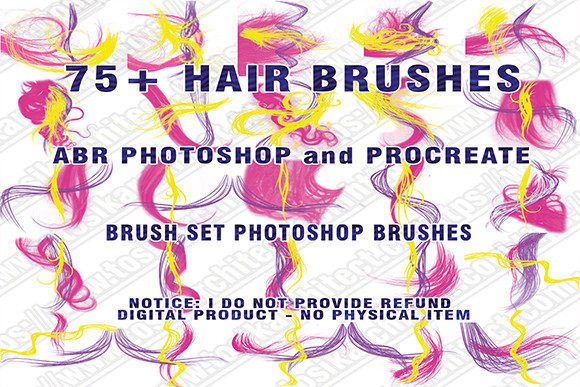
Digital illustration has transformed the way artists approach character design, with hair rendering often cited as one of the most challenging aspects of the process. For artists working within the Apple ecosystem, specialized tools can significantly streamline this workflow. The 21 Ipad Hair Brushes for Procreate is a curated digital asset pack designed specifically to address these challenges. This collection offers a targeted solution for illustrators seeking efficiency and variety in their hair styling techniques, providing a mix of glowing, single-color, multi-colored, and loose texture brushes.
Understanding whether this specific brush set aligns with your artistic workflow requires a clear look at its features, limitations, and intended use cases. As a digital product, it operates under specific technical constraints that potential users must consider before purchasing. This evaluation aims to provide a balanced perspective on who benefits most from this tool and what alternatives might serve different needs.
What Is Included in the Brush Pack
The core value of this download lies in its diversity. The pack contains twenty-one distinct brushes, each engineered to handle different hair textures and lighting effects. Rather than offering a generic set of standard strokes, the creator has categorized the brushes into several functional groups:
- Glowing Hair Brushes: These are designed to add luminosity and highlight effects, useful for fantasy characters or stylized portraits where light interaction is key.
- Single-Color Brushes: Ideal for base layers and solid color blocking, allowing for clean, uniform strokes.
- Multi-Colored Brushes: A unique feature of this pack, these brushes dynamically change colors based on the selected palette in Procreate, adding depth and variation without manual blending.
- Loose, Straight, and Curly Textures: These cater to specific hair types, providing pre-defined shapes that mimic natural flow and volume.
It is important to note that the multi-colored brushes rely on the user’s active color selection. This means the output is not static; it responds to the artist’s choices, offering a level of interactivity that can speed up the rendering of complex highlights and shadows.
Technical Compatibility and Constraints
Before considering the artistic merits, one must address the technical requirements. This product is strictly compatible with Apple iPad devices using a stylus and the Procreate app. It is not a universal brush file. Users attempting to import these files into Adobe Photoshop, Clip Studio Paint, or other desktop-based painting programs will find them incompatible. This limitation is inherent to the proprietary brush engine used by Procreate.
Furthermore, this is a purely digital transaction. There is no physical shipment involved. Upon confirmation of payment, the files are available for instant download. This immediacy is a benefit for those needing quick assets, but it also introduces a strict no-refund policy. Because digital files cannot be "returned" once accessed, exchanges are not possible. Potential buyers should ensure their device meets the software requirements and that they are comfortable with the non-refundable nature of instant downloads before completing the purchase.
Benefits for Digital Artists
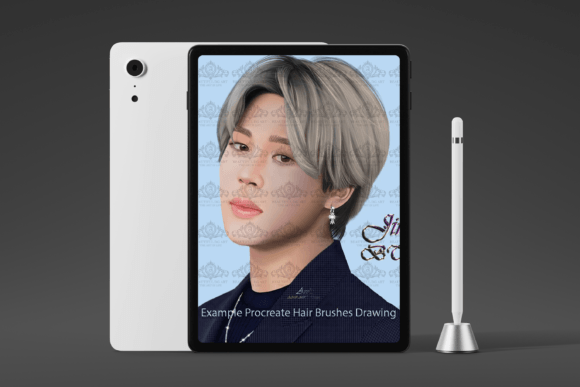
The primary advantage of using the 21 Ipad Hair Brushes for Procreate is time efficiency. Rendering hair strand-by-strand is a labor-intensive process that can consume hours of an illustration session. By utilizing pre-configured brushes for curly, straight, and loose hair, artists can block in shapes and add texture rapidly. This allows more time to be spent on facial features, clothing, and background elements.
Additionally, the inclusion of glowing and multi-colored brushes provides built-in lighting effects. For artists who struggle with digital lighting theory, these tools offer a shortcut to achieving professional-looking highlights and subsurface scattering effects. The ability to switch between single-color precision and multi-colored variance within the same pack adds versatility, making it suitable for both flat design styles and more painterly approaches.
Tradeoffs and Considerations
While specialized brushes offer speed, they can also lead to a homogeneous look if overused. Relying heavily on preset textures may inhibit the development of fundamental drawing skills. Artists should view these brushes as aids rather than replacements for understanding hair anatomy and flow. The "loose" and "curly" presets provide a starting point, but manual refinement is often necessary to integrate the hair naturally with the character’s head shape and movement.
Another consideration is the learning curve associated with the multi-colored brushes. Since these react to the selected color palette, users must experiment to understand how different color combinations affect the final stroke. This requires a period of adjustment and testing, which may initially slow down the workflow before speeding it up.
Ideal Use Cases
This brush pack is a strong fit for several specific scenarios:
- Character Designers: Professionals who need to iterate through multiple hairstyle options quickly will benefit from the variety of textures.
- Fantasy Illustrators: The glowing brushes are particularly useful for creating magical or ethereal character effects.
- Procreate Beginners: New users who find hair rendering daunting can use these tools to achieve credible results while they build their foundational skills.
- Commission Artists: Those working on tight deadlines can leverage the efficiency of these brushes to maintain high output without sacrificing quality.
When to Consider Alternatives
Despite its benefits, this pack may not be the right choice for everyone. If you primarily work on desktop platforms using Photoshop or Clip Studio Paint, this product is irrelevant due to compatibility issues. In such cases, seeking out .abr or .sut brush sets would be more appropriate.
Additionally, artists who prefer a highly realistic, photographic style may find preset brushes limiting. Realistic hair often requires custom brush dynamics and meticulous manual detailing that pre-made stamps cannot fully replicate. For these users, investing in courses on hair anatomy or creating custom brushes tailored to their specific style might yield better long-term results.
Finally, if you are unsure about your commitment to digital art or are still exploring different apps, purchasing specialized asset packs may be premature. Free brush libraries available within the Procreate community can offer a risk-free way to test similar workflows before investing in premium packs.
Making the Decision
Choosing the 21 Ipad Hair Brushes for Procreate ultimately depends on your current workflow and artistic goals. If you are an iPad-based illustrator looking to reduce the time spent on hair rendering and want to experiment with dynamic lighting effects, this pack offers a practical and immediate solution. The variety of textures ensures that it can handle a range of styles, from sleek straight hair to voluminous curls.
However, success with this tool requires an understanding of its limitations. It is not a magic button for perfect hair, but rather a sophisticated set of instruments that require skillful application. By combining these brushes with a solid understanding of form and light, artists can enhance their productivity and expand their creative possibilities. Always verify your device compatibility and review the no-refund policy to ensure a smooth purchasing experience.